RestApiModule - Outputs Api
Get all or one or more outputs by outputName
Returns all available outputs and their (logical) state or one or more outputs by passing their outputName. See SupportedDevices to learn more about what outputs are available.
Authorization level
30 (RestApiModuleGetData )
URL parameters
endcustomerId: Endcustomer Id.
assetId: Asset Id.
deviceId: Device Id of peripheral linked to the asset.
outputName1 / outputName2: (optional) See SupportedDevices to learn more about what outputs are available.
- GET /endcustomers/{endcustomerId}/assets/{assetId}/restapi/hal/devices/{deviceId}/outputs?outputName={outputName1}&outputName={outputName2}
Example request:
GET /endcustomers/edfd1133-88ec-4f2d-abb8-16238c6ad926/assets/10401990013-123455789/restapi/hal/devices/WTIO1/outputs HTTP/1.1
Accept: application/json
Authorization: Bearer eyJhbGciOiJS...
X-API-Version: 1.0
Example response:
HTTP/1.1 200 OK
Content-Type: application/json; charset=utf-8
Api-Supported-Versions: 1.0

[
   {
      "name": "OUTD1",
      "value": 0
   },
   {
      "name": "OUTD2",
      "value": 0
   },
   //...more outputs...
   {
      "name": "OUTD8",
      "value": 0
   }
]
- Status Codes:
200 OK – OK
400 Bad Request – Bad Request, parameters validation failed
401 Unauthorized – Unauthorized. Something is wrong with the Authorization header of the request
403 Forbidden – Forbidden.
429 Too Many Requests – Too Many Requests.
500 Internal Server Error – Internal Server Error
- Response Headers:
Content-Type – application/json; charset=utf-8
Api-Supported-Versions – supported api versions
- Response JSON Object:
outputs (array) – array with outputs and their logical values (0 or 1)
Set one or more outputs
Sets one or more outputs to a desired (logical) state. See SupportedDevices to learn more about what outputs are available.
Authorization level
31 (RestApiModuleExecuteCommand )
URL parameters
endcustomerId: Endcustomer Id.
assetId: Asset Id.
deviceId: Device Id of peripheral linked to the asset.
URL body
Array with outputs, each with their desired action and logical value(s). To be able to support all action types on a specific output, the following generic parameters are used for each output:
state (integer) : possible values : 1,2,3 or 4
1 : Set / Set Pulse : persistent set to a value or set to a value for a certain time
2 : Reset : persistent set to value 0
3 : Toggle: persistent set to previous value
4 : Interval: repetitively set to either value1 or value2 for a certain time
value1 (integer) : 0 or >0 (always 1 for digital output)
time1 (integer) : time in ms. Value may be 0 or >100 [100,65635]
value2 (integer) : 0 or >0 (always 1 for digital output)
time2 (integer) : time in ms. Value may be 0 or >100 [100,65635]
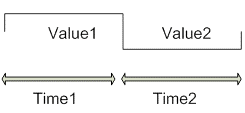
The table below specifies the values for Value1, Time1, Value2, Time2 related to the State property
State |
Value1 |
Time1 |
Value2 |
Time2 |
Result |
Reset |
x |
x |
x |
x |
Persistent set to value 0 |
Toggle |
x |
x |
x |
x |
Persistent set to previous value |
Set |
>0 |
0 |
0 |
0 |
Set persistently to Value1 |
Set |
>0 |
1000 |
0 |
0 |
Set to Value1 for 1000ms, then persistent set to value 0 (Set Pulse) |
Set |
0 |
0 |
>0 |
>0 |
Not supported |
Interval |
>0 |
1000 |
>0 |
1000 |
Set to Value1 for 1 second, then set to Value2 for 1 second and repeat this endlessly. |
- POST /endcustomers/{endcustomerId}/assets/{assetId}/restapi/hal/devices/{deviceId}/outputs
Example request:
POST /endcustomers/edfd1133-88ec-4f2d-abb8-16238c6ad926/assets/10401990013-123455789/restapi/hal/devices/WTIO1/outputs HTTP/1.1
Content-Type: application/json
Accept: application/json
Authorization: Bearer eyJhbGciOiJS...
X-API-Version: 1.0

[
  {
      "name": "OUTD1",
      "state" : 1,
      "value1" : 1,
      "time1" : 0,
      "value2" : 0,
      "time2" : 0
  },
  //more outputs...
  {
      "name": "OUTDX",
      "state" : 1,
      "value1" : 1,
      "time1" : 1000,
      "value2" : 0,
      "time2" : 0
  }
]
Example response:
HTTP/1.1 200 OK
Content-Type: application/json; charset=utf-8
Api-Supported-Versions: 1.0
- Status Codes:
200 OK – OK
400 Bad Request – Bad Request, parameters validation failed
401 Unauthorized – Unauthorized. Something is wrong with the Authorization header of the request
403 Forbidden – Forbidden.
429 Too Many Requests – Too Many Requests.
500 Internal Server Error – Internal Server Error
- Response Headers:
Content-Type – application/json; charset=utf-8
Api-Supported-Versions – supported api versions